http etiketine sahip kayıtlar gösteriliyor. Tüm kayıtları göster

14 Nisan 2015 Salı

HTTP status codes

1xx Informational Responses

HTTP status codes in the 1xx are typically informational.
  • 100 Continue
  • 101 Switching Protocols
  • 102 Processing
  • 103 Checkpoint
  • 122 Request-URI too long

2xx Successful Responses

Status codes in the 2xx range indicate that the transaction was received, understood, accepted and processed successfully.
  • 200 OK
  • 201 Created
  • 202 Accepted
  • 203 Non-Authoritative Information (since HTTP/1.1)
  • 204 No Content
  • 205 Reset Content
  • 206 Partial Content
  • 207 Multi-Status (WebDAV) (RFC 4918)
  • 226 IM Used (RFC 3229)

3xx Redirection Responses

HTTP status codes in the 3xx range pertain to redirection. The client must take additional action to complete the request.[
  • 300 Multiple Choices
  • 301 Moved Permanently
  • 302 Found
  • 303 See Other (since HTTP/1.1)
  • 304 Not Modified
  • 305 Use Proxy (since HTTP/1.1)
  • 306 Switch Proxy
  • 307 Temporary Redirect (since HTTP/1.1)
  • 308 Resume Incomplete

4xx Client Error

HTTP status codes in the 4xx range indicate that a problem occurred with the request.
  • 400 Bad Request
  • 401 Unauthorized
  • 402 Payment Required
  • 403 Forbidden
  • 404 Not Found
  • 405 Method Not Allowed
  • 406 Not Acceptable
  • 407 Proxy Authentication Required
  • 408 Request Timeout
  • 409 Conflict
  • 410 Gone
  • 411 Length Required
  • 412 Precondition Failed
  • 413 Request Entity Too Large
  • 414 Request-URI Too Long
  • 415 Unsupported Media Type
  • 416 Requested Range Not Satisfiable
  • 417 Expectation Failed
  • 418 I'm a teapot (RFC 2324)
  • 422 Unprocessable Entity (WebDAV) (RFC 4918)
  • 423 Locked (WebDAV) (RFC 4918)
  • 424 Failed Dependency (WebDAV) (RFC 4918)
  • 425 Unordered Collection (RFC 3648)
  • 426 Upgrade Required (RFC 2817)
  • 428 Precondition Required
  • 429 Too Many Requests
  • 431 Request Header Fields Too Large
  • 444 No Response
  • 449 Retry With
  • 450 Blocked by Windows Parental Controls
  • 499 Client Closed Request

5xx Server Error

Error codes in the 5xx range indicate that server is aware that it has encountered an error or is otherwise incapable of performing the request.
  • 500 Internal Server Error
  • 501 Not Implemented
  • 502 Bad Gateway
  • 503 Service Unavailable
  • 504 Gateway Timeout
  • 505 HTTP Version Not Supported
  • 506 Variant Also Negotiates (RFC 2295)
  • 507 Insufficient Storage (WebDAV) (RFC 4918)
  • 509 Bandwidth Limit Exceeded (Apache bw/limited extension)
  • 510 Not Extended (RFC 2774)
  • 511 Network Authentication Required
  • 598 (Informal convention) network read timeout error
  • 599 (Informal convention) network connect timeout error

5 Mart 2015 Perşembe

HTTP header'ları

http://en.wikipedia.org/wiki/List_of_HTTP_header_fields

http://www.tutorialspoint.com/http/http_header_fields.htm

Bir HTTP request mesajının anatomisi


GET /tutorials/other/top-20-mysql-best-practices/ HTTP/1.1
Host: net.tutsplus.com
User-Agent: Mozilla/5.0 (Windows; U; Windows NT 6.1; en-US; rv:1.9.1.5) Gecko/20091102 Firefox/3.5.5 (.NET CLR 3.5.30729)
Accept: text/html,application/xhtml+xml,application/xml;q=0.9,*/*;q=0.8
Accept-Language: en-us,en;q=0.5
Accept-Encoding: gzip,deflate
Accept-Charset: ISO-8859-1,utf-8;q=0.7,*;q=0.7
Keep-Alive: 300
Connection: keep-alive
Cookie: PHPSESSID=r2t5uvjq435r4q7ib3vtdjq120
Pragma: no-cache
Cache-Control: no-cache

Yukarıda örnek bir HTTP GET request mesajı görüyoruz. Bu mesajı satır satır inceleyelim.

Request line

GET /tutorials/other/top-20-mysql-best-practices/ HTTP/1.1

1.satırda GET metodu ile servera bir web sayfası almak istediğimizi belirtiyoruz. 
GET metodunu takip eden adreste yani "Request-uri" kısmında da hangi adresteki sayfayı istediğimizi söylüyoruz. 
En sondaki HTTP/1.1 ile de formalite icabı istemci olarak kullandığımız HTTP versiyonunu servera bildiriyoruz.

Host

Host: net.tutsplus.com

2.satırda Host headerı ile DNS domain name belirterek hangi domain'den bu sayfayı istediğimize açıklık getiriyoruz.

Bunun sebebi aynı serverda birden fazla domain host ediliyor olabilir. Bu yüzden de serverın hangi domain'i kastettiğimizi bilmesi gerekiyor.
İşte tam olarak bu zorunluluktan dolayı sunucuya yapılan isteklerde bulunması gereken Request line dışındaki tek zorunlu header Host headerıdır.

Bu bilgiyi 1.satırdaki path ile birleştirince URL ortaya çıkıyor.

User-Agent

User-Agent: Mozilla/5.0 (Windows; U; Windows NT 6.1; en-US; rv:1.9.1.5) Gecko/20091102 Firefox/3.5.5 (.NET CLR 3.5.30729)

Burada browserın ne olduğu ver versiyon bilgisi veriliyor.

Accept

Accept: text/html,application/xhtml+xml,application/xml;q=0.9,*/*;q=0.8

Burada hangi içerik türlerini kabul ettiğimizi belirtiyoruz.

Accept-language

Accept-Language: en-us,en;q=0.5

Burada hangi dilleri kabul ettiğimizi belirtiyoruz.

Accept-charset

Accept-Encoding: gzip,deflate

Burada kabul ettiğimiz karakter seti bildiriyoruz.

Keep-alive

Keep-Alive: 300

Burada belirtilen süre boyunca yeniden tcp connection oluşturmaya gerek kalmadan istekte bulunabilmek istediğimizi belirtiyoruz (= HTTP pipelining).
Eğer keepalive değeri belirtmezsek her istekte tekrardan yeni bir tcp bağlantısı oluşturulur.

Connection

Connection: keep-alive

Burada tcp bağlantısını keepalive headerinda belirttiğimiz şekilde açık tutmak istediğimizi belirtiyoruz. Eğer connection: close olsaydı hemen bağlantı kapatılacaktı.

Cookie

Cookie: PHPSESSID=r2t5uvjq435r4q7ib3vtdjq120

Burada bir cookie bilgisi gönderiyoruz.


Pragma

Pragma: no-cache


Cache-control

Cache-Control: no-cache


Bir başka request örneği:


GET /docs/index.html HTTP/1.1
Host: www.test101.com
Accept: image/gif, image/jpeg, */*
Accept-Language: en-us
Accept-Encoding: gzip, deflate
User-Agent: Mozilla/4.0 (compatible; MSIE 6.0; Windows NT 5.1)
(blank line)

Bu mesajda Request line ve Host dışında opsiyonel headerlardan 4 tanesi eklenmiş.
İlk iki satır ile istediğimiz sayfanın URLsini host ile request-uri yi birleştirerek görebiliriz:
www.test101.com/docs/index.html sayfasını istiyoruz.

Accept headerı ile kabul edilen dosya türleri arasında gif ve jpeg imajları da bulunduğunu,
Accept-language headerı ile en-us dilini kabul ettiğimizi,
Accept-encoding headerı ile gzip, deflate kodlama türlerini kabul ettiğimizi,
User-Agent headerı ile de Mozilla 4.0 tarayıcısı kullandığımızı ,
servera bildiriyoruz.

Boş satır ile de mesaj son buluyor.

Bir HTTP response mesajının anatomisi.

HTTP/1.1 200 OK
Date: Sun, 10 Oct 2010 23:26:07 GMT
Server: Apache/2.2.8 (Ubuntu) mod_ssl/2.2.8 OpenSSL/0.9.8g
Last-Modified: Sun, 26 Sep 2010 22:04:35 GMT
ETag: "45b6-834-49130cc1182c0"
Accept-Ranges: bytes
Content-Length: 13
Connection: close
Content-Type: text/html

<!doctype html>
<html>
<head>
  <title>An Example Page</title>
</head>
<body>
  Hello World, this is a very simple HTML document.
</body>
</html>

Yukarıdaki mesaj örnek bir HTTP response mesajıdır.
Bu mesajı satır satır inceleyelim.

Status line

HTTP/1.1 200 OK

1. satırda status line'ı görüyoruz.
Server bize HTTP/1.1 versiyonu kullandığını belirtiyor.
200 status code ve OK reason phrase ile işlemin başarılı olduğunu anlıyoruz.
Yani server isteğimize gerektiği gibi yanıt verebildiğini söylüyor "no problem".

Date

Date: Sun, 10 Oct 2010 23:26:07 GMT

2. satırda Date: headerı ile tarih bilgisi gelmiş. Server gönderdiği mesajları daima tarih ve saat bilgisi ile işaretler. 
Bu yüzden Date headerı "General header" yani genel başlıklar kategorisine girer.

Server

Server: Apache/2.2.8 (Ubuntu) mod_ssl/2.2.8 OpenSSL/0.9.8g

3. satırda Server: headerı ile server bize kendini tanıtıyor. 
Bu bilgiler Apache versiyon 2.2.8 olduğu, Ubuntu işletim sistemi üzerinde çalıştığı ve OpenSSL 0.9.8g kullandığı şeklinde.

Last-Modified

Last-Modified: Sun, 26 Sep 2010 22:04:35 GMT

4. satırda Last-Modified headerı ile istediğimiz dokumanın en son ne zaman değiştirildiğini öğreniyoruz. Yani bu tarihtan beri istekte bulunduğumuz web sayfasına hiç müdahale edilmemiş.
Burada server bir nevi sayfanın güncelliğinden bizi haberdar ediyor. 
Bu header genellikle en son baktığımızdan bu yana sayfada bir değişiklik olup olmadığını öğrenmemizi sağlar. Eğer değişmediyse tekrar aynı sayfayı serverdan almamıza gerek yok demektir.

ETag

ETag: "45b6-834-49130cc1182c0"

5. satırda ETag headerı ile istediğimiz sayfaya bir "entity tag" veriyor. Daha sonra karşılaştırmak istersek diye.

Accept-ranges

Accept-Ranges: bytes

6.satırda Accept-ranges headerı ile serverın partial content isteklerini byte range şeklinde kabul ettiğini bildiriyor. Eğer Accept-range: none olsaydı serverın partial content isteklerini kabul etmediği anlamına gelirdi.

Content-length

Content-Length: 13

7. satırda Content-length headerı ile içeriğin boyutunu öğreniyoruz. Bu mesajın içeriği 13 bitmiş.
İçerikle ilgili olduğundan bu header "content headers" yani içerik başlıkları kategorisine giriyor.

Connection

Connection: close

8. satırda Connection headerı ile bize bağlantı durumunu bildiriyor. Yani server işlem tamamlandığından tcp bağlantısını (serverdaki soketi) artık kapattığını haber veriyor.

Content-type

Content-Type: text/html

9.satırda Content-type headerı ile server gönderdiği içeriğin tipini belirtiyor. Burada bir web sayfası istediğimizden tip text/html olarak belirtilmiş.

Empty-line / Boş satır

10.satırda boş bir satır konulduğunu görüyoruz. Mesaj gövdesi yani body den hemen önce boş bir satır konulur. Bu satır CR ve LF den oluşur.
Bu satırdan itibaren mesaj gövdesi yani serverdan istediğimiz içeriğin geldiğini haber verir.

Message body / Mesaj gövdesi

<html>
<head>
  <title>An Example Page</title>
</head>
<body>
  Hello World, this is a very simple HTML document.
</body>
</html>

11. satır ve devamında bir html içeriği olduğunu görüyoruz.
Serverdan istemiş olduğumuz web sayfası bize mesaj gövdesi içinde html kodları olarak gönderilmiş.


...

Böylece örnek bir HTTP response mesajının nelerden oluştuğunu, ve aslında her bulunduğumuz istekte bize server tarafından sayfa içeriğine ek olarak bir çok bilgi gönderildiğini de gözlemlemiş olduk.


HTTP protokolü üzerine.

HTTP protokolünün şeması


Kullanıcı tarafından bir adres görüntülenmek istendiğinde, ilgili adrese bir request gönderilir.

Bu request, sunucu tarafında değerlendirilerek bir response oluşturulur ve istemciye geri gönderilir. Burada browser tarafından oluşturulan request nesnesinde kullanıcı tarafından girilen bazı bilgiler de gönderilir. Mesela kullanıcı adı ve şifre gibi.

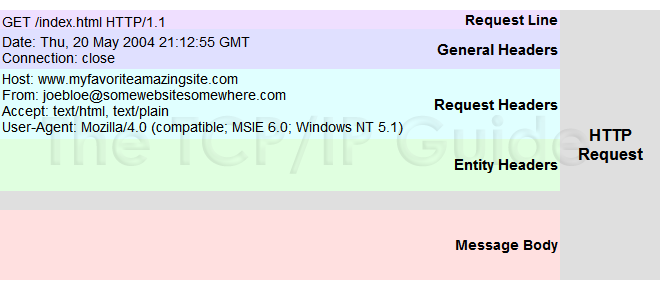
Örnek bir request mesajı


Bir request mesajı nelerden oluşur?

<request-line>
<general-headers>
<request-headers>
<entity-headers>
<empty-line>
[<message-body>]

Yukarıdaki sıralama bir request mesajının anatomisidir.
Bu listedeki request header'lar "Host" haricinde tamamen opsiyoneldir. Yani bulunmaları mecburi değildir.
Yani sadece request line ve Host header'ı bir request yollamak için yeterlidir.

Örneğin şu request geçerlidir:

GET /index.html HTTP/1.1
Host: www.example.com

Bütün alanlar <CR><LF> ile bitmek zorundadır. 
CR: carriage return
LF: line feed
Empty-line alanı sadece <CR><LF> den oluşur. Başka karakter içeremez.

Request mesajının ilk satırı yani "request line" neler içerir?

Request mesajının ilk satırı şöyledir:
request-method-name request-URI HTTP-version

Buradaki metod : HTTP 1.1de tanımlanan 8 metoddan biri (örneğin GET)
Request-uri : İstenilen kaynağın adresi (örneğin /index.html)
Http-version : HTTP/1.1

Request line örnekleri:
GET /test.html HTTP/1.1
HEAD /query.html HTTP/1.0
POST /index.html HTTP/1.1

Request line'daki HTTP request (istek) metodları nelerdir?

GET: Dosya çağırma komutudur.
HEAD: Get komutuna benzer ancak sadece başlık bilgilerini gönderir.
POST: Web servera veri yollamak için kullanılır. Parametre içerir.
DELETE: Serverdan dosyayı silmesini ister.
OPTIONS: Serverdan desteklediği metodların listesini ister.
PUT: Bir veriyi serverda saklamak üzere gönderir.
TRACE: Serverdan yaptığı işlemlerin diagnostic trace ini göndermesini ister.
CONNECT:SSL bağlantılarının proxy ile yapılmasında kullanılır.

En çok kullanılan http request metodları Get ve Post metodlarıdır.
Get metodu basit istekler veya bilgi alma amaçlı kullanılır.
Post ise daha kompleks istekler veya veritabanı işlemleri için kullanılabilir. 

Request'te bulunan header'lar nelerdir?

HTTP headerları name:value yani isim:değer çiftleridir.
Birden fazla değer araya virgül konarak belirtilebilir.

Örnek request headerları:
Host: www.xyz.com
Connection: Keep-Alive
Accept: image/gif, image/jpeg, */*
Accept-Language: us-en, fr, cn

HTTP request leri test etmek

Telnet ile bir servera TCP/IP bağlantısı kurup direkt olarak http requestleri gönderebiliriz.
Örneğin:
> telnet
telnet> help
... telnet help menu ...
telnet> open 127.0.0.1 8000
Connecting To 127.0.0.1...
GET /index.html HTTP/1.0
(Hit enter twice to send the terminating blank line ...)
... HTTP response message ...

Ya da örneğin Java'da Socket kullanarak bir http client yazabiliriz:
import java.net.*;
import java.io.*;
   
public class HttpClient {
   public static void main(String[] args) throws IOException {
      // The host and port to be connected.
      String host = "127.0.0.1";
      int port = 8000;
      // Create a TCP socket and connect to the host:port.
      Socket socket = new Socket(host, port);
      // Create the input and output streams for the network socket.
      BufferedReader in
         = new BufferedReader(
              new InputStreamReader(socket.getInputStream()));
      PrintWriter out
         = new PrintWriter(socket.getOutputStream(), true);
      // Send request to the HTTP server.
      out.println("GET /index.html HTTP/1.0");
      out.println();   // blank line separating header & body
      out.flush();
      // Read the response and display on console.
      String line;
      // readLine() returns null if server close the network socket.
      while((line = in.readLine()) != null) {
         System.out.println(line);
      }
      // Close the I/O streams.
      in.close();
      out.close();
   }
}

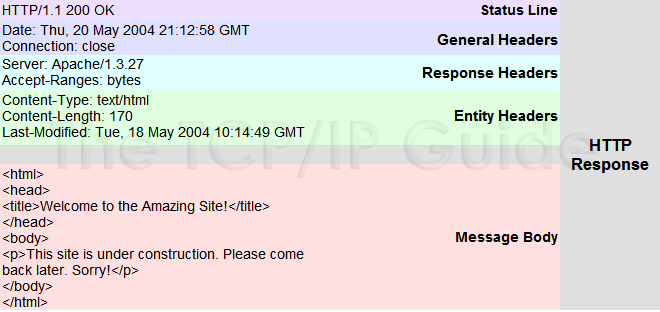
Örnek bir response mesajı

Bir response mesajı nelerden oluşur?

<status-line>
<general-headers>
<response-headers>
<entity-headers>
<empty-line>
[<message-body>]
[<message-trailers>]

Yukarıdaki sıralama bir response mesajının anatomisidir.

Response mesajının ilk satırı yani "status line" neler içerir?

Status line şu şekildedir: <HTTP-VERSION> <status-code> <reason-phrase>
HTTP-Version: Server'ın kullandığı http protokolü versiyonunu belirtir (örneğin HTTP/1.1)
Status-code : 3 haneli durum kodu (örneğin 200)
Reason-phrase : Durum açıklaması (örneğin OK)

Örnek bir response'tan status line:
HTTP/1.1 200 OK

Status-code yani durum kodları nelerdir?


1xx : Bilgi amaçlı kodlardır
2xx : İşlemin başarılı olduğunu belirtir
3xx : Yönlendirme yapıldığını belirtir
4xx : Client error yani istemcinin gönderdiği istekte bir hata olduğunu belirtir (syntax hatası vb.)
5xx : Server error yani sunucuda bir hata olduğunu belirtir (gönderilen istekte hata olmadığı, serverdan kaynaklanan bir sorun nedeniyle işlemin yapılamadığı anlamına gelir)

En sık görülenler:
200: OK , yani işlem başarılı.
404: not found, yani aradığımız sayfa belirttiğimiz adreste yok.
500: internal server error, yani sunucuda bir hata oluştuğundan isteğimizi gerçekleştiremedi.

Durum kodları tam listesi


100
Continue
Client should continue sending its request. This is a special status code; see below for details.
101
Switching Protocols
The client has used the Upgrade header to request the use of an alternative protocol and the server has agreed.
200
OK
Generic successful request message response. This is the code sent most often when a request is filled normally.
201
Created
The request was successful and resulted in a resource being created. This would be a typical response to a PUT method.
202
Accepted
The request was accepted by the server but has not yet been processed. This is an intentionally “non-commital” response that does not tell the client whether or not the request will be carried out; the client determines the eventual disposition of the request in some unspecified way. It is used only in special circumstances.
203
Non-Authoritative Information
The request was successful, but some of the information returned by the server came not from the original server associated with the resource but from a third party.
204
No Content
The request was successful, but the server has determined that it does not need to return to the client an entity body.
205
Reset Content
The request was successful; the server is telling the client that it should reset the document from which the request was generated so that a duplicate request is not sent. This code is intended for use with forms.
206
Partial Content
The server has successfully fulfilled a partial GET request. See the topic on methods for more details on this, as well as the description of the Range header.
300
Multiple Choices
The resource is represented in more than one way on the server. The server is returning information describing these representations, so the client can pick the most appropriate one, a process called agent-driven negotiation.
301
Moved Permanently
The resource requested has been moved to a new URL permanently. Any future requests for this resource should use the new URL.

This is the proper method of handling situations where a file on a server is renamed or moved to a new directory. Most people don't bother setting this up, which is why URLs “break” so often, resulting in 404 errors as discussed below.
302
Found
The resource requested is temporarily using a different URL. The client should continue to use the original URL. See code 307.
303
See Other
The response for the request can be found at a different URL, which the server specifies. The client must do a fresh GET on that URL to see the results of the prior request.
304
Not Modified
The client sent a conditional GET request, but the resource has not been modified since the specified date/time, so the server has not sent it.
305
Use Proxy
To access the requested resource, the client must use a proxy, whose URL is given by the server in its response.
306
(unused)
Defined in an earlier (draft?) version of HTTP and no longer used.
307
Temporary Redirect
The resource is temporarily located at a different URL than the one the client specified.

Note that 302 and 307 are basically the same status code. 307 was created to clear up some confusion related to 302 that occurred in earlier versions of HTTP (which I'd rather not get into!)
400
Bad Request
Server says, “huh?” J Generic response when the request cannot be understood or carried out due to a problem on the client's end.
401
Unauthorized
The client is not authorized to access the resource. Often returned if an attempt is made to access a resource protected by a password or some other means without the appropriate credentials.
402
Payment Required
This is reserved for future use. Its mere presence in the HTTP standard has caused a lot of people to scratch their chins and go “hmm…” J
403
Forbidden
The request has been disallowed by the server. This is a generic “no way” response that is not related to authorization. For example, if the maintainer of Web site blocks access to it from a particular client, any requests from that client will result in a 403 reply.
404
Not Found
The most common HTTP error message, returned when the server cannot locate the requested resource. Usually occurs due to either the server having moved/removed the resource, or the client giving an invalid URL (misspellings being the most common cause.)
405
Method Not Allowed
The requested method is not allowed for the specified resource. The response includes an Allow header that indicates what methods the server will permit.
406
Not Acceptable
The client sent a request that specifies limitations that the server cannot meet for the specified resource. This error may occur if an overly-restrictive list of conditions is placed into a request such that the server cannot return any part of the resource.
407
Proxy Authentication Required
Similar to 401, but the client must first authenticate itself with the proxy.
408
Request Timeout
The server was expecting the client to send a request within a particular time frame and the client didn't send it.
409
Conflict
The request could not be filled because of a conflict of some sort related to the resource. This most often occurs in response to a PUT method, such as if one user tries to PUT a resource that another user has open for editing, for example.
410
Gone
The resource is no longer available at the server, which does not know its new URL. This is a more specific version of the 404 code that is used only if the server knows that the resource was intentionally removed. It is seen rarely (if ever) compared to 404.
411
Length Required
The request requires a Content-Length header field and one was not included.
412
Precondition Failed
Indicates that the client specified a precondition in its request, such as the use of an If-Match header, which evaluated to a false value. This indicates that the condition was not satisfied so the request is not being filled. This is used by clients in special cases to ensure that they do not accidentally receive the wrong resource.
413
Request Entity Too Large
The server has refused to fulfill the request because the entity that the client is requesting is too large.
414
Request-URI Too Long
The server has refused to fulfill the request because the URL specified is longer than the server can process. This rarely occurs with properly-formed URLs but may be seen if clients try to send gibberish to the server.
415
Unsupported Media Type
The request cannot be processed because it contains an entity using a media type the server does not support.
416
Requested Range Not Satisfiable
The client included a Range header specifying a range of values that is not valid for the resource. An example might be requesting bytes 3,000 through 4,000 of a 2,400-byte file.
417
Expectation Failed
The request included an Expect header that could not be satisfied by the server.
500
Internal Server Error
Generic error message indicating that the request could not be fulfilled due to a server problem.
501
Not Implemented
The server does not know how to carry out the request, so it cannot satisfy it.
502
Bad Gateway
The server, while acting as a gateway or proxy, received an invalid response from another server it tried to access on the client's behalf.
503
Service Unavailable
The server is temporarily unable to fulfill the request for internal reasons. This is often returned when a server is overloaded or down for maintenance.
504
Gateway Timeout
The server, while acting as a gateway or proxy, timed out while waiting for a response from another server it tried to access on the client's behalf.
505
HTTP Version Not Supported
The request used a version of HTTP that the server does not understand.